Mobile onboarding for B2B SaaS
Originally published on OpenView’s blog
For the longest time, B2B SaaS companies have been putting mobile experience on the back burner because:
- Users don’t work on mobile.
- The bulk of mobile traffic comes from developing nations (read: low budget).
However, as both time spent on mobile and mobile traffic share continue to increase globally, business users are becoming more accustomed to discovering products on mobile. Chances are good that you are reading this on your phone right now.
Even the biggest SaaS market, the U.S., is now seeing a 50/50 split between mobile and desktop traffic — a significant change from the 25/75 split in 2015.
So, build a mobile version?
Not exactly. Unless your product is expected to be used on the go (example: live chat), the ROI of building a mobile version will be extremely low.
What B2B SaaS companies can do is improve the activation experience on mobile (a.k.a. mobile onboarding) so that users will return on desktop for a better chance of conversion.
Below, I’ll share how B2B SaaS companies can optimize their mobile onboarding flows throughout four stages.
1. Public website
A well-optimized mobile website doesn’t just help with signup conversions. It is now crucial for your overall SEO, as Google officially switched to mobile-first indexing in 2020.
Many people think that mobile optimization is only about rearranging website layout. Unfortunately, that’s far from enough.
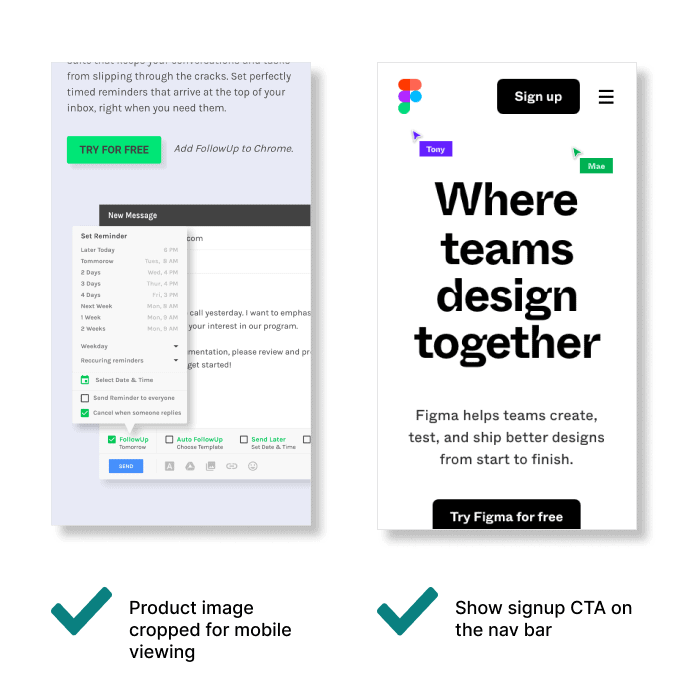
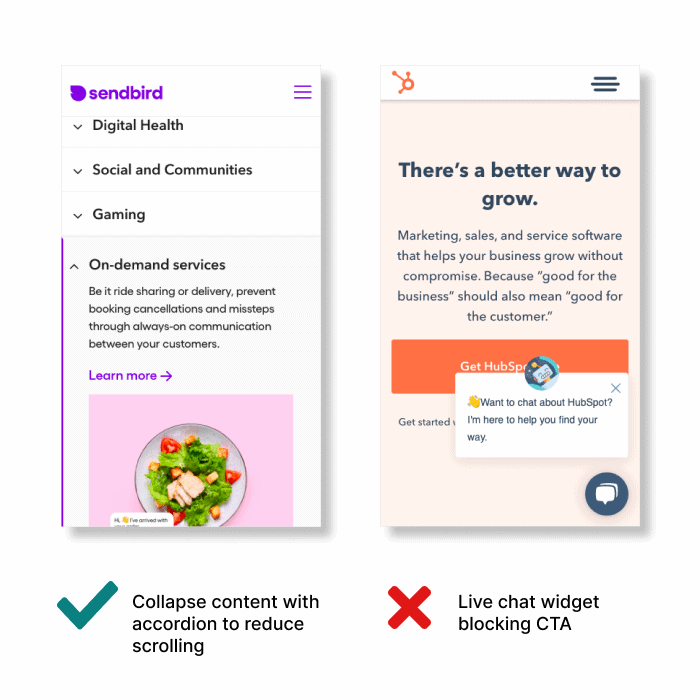
True mobile optimization requires every element of your website to be adjusted for small screens. For example:
- Crop images and videos for vertical viewing.
- Show signup CTA on the nav bar (instead of hidden in the hamburger menu).
- Make sure the live chat widget isn’t blocking CTAs.
- Use mobile-specific UI/UX patterns to highlight key information and reduce scrolling.
- Use AMP for suitable pages to reduce loading time.
You should optimize all of your pre-signup pages, including the home page, PPC landing pages, blog posts, pricing page, and even help articles.
Also, make sure you serve the same content on both desktop and mobile to avoid SEO penalties.
2. Signup flow
When it comes to signup, the limited screen space on mobile could actually work in your favor.
Because users can access the verification email directly via a push notification without switch tabs, they are more likely to complete the step. To take advantage of this mobile-specific experience, you can even offer passwordless signup or Google One Tap to improve conversions.
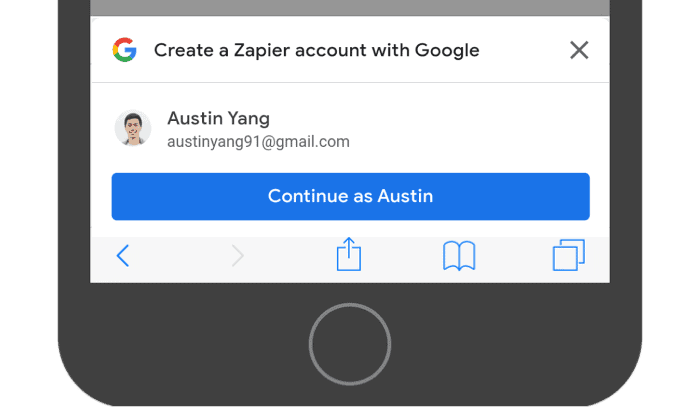
Zapier offers visitors a quick signup experience using Google One Tap
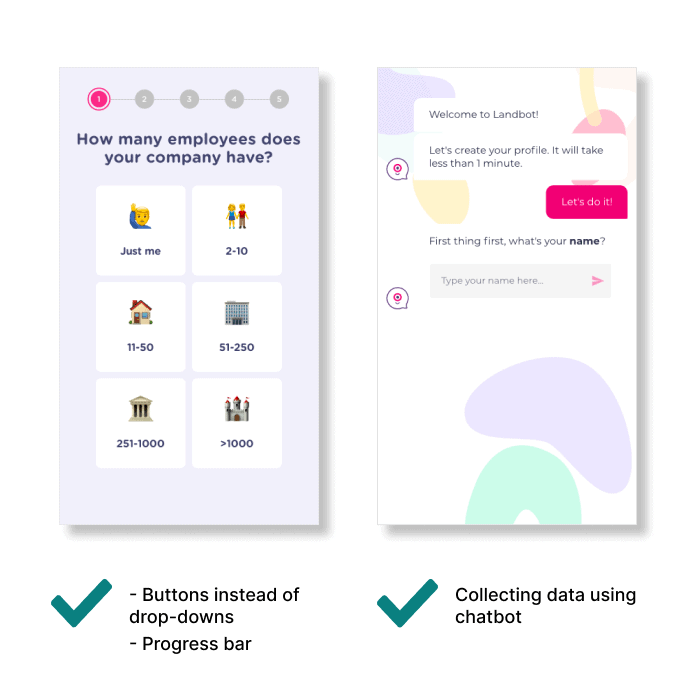
If your signup flow comes with a survey to collect user data, make sure to apply best practices for mobile form design. For example:
- Limit the number of questions per screen.
- Show a progress bar.
- Present options as buttons instead of drop-downs.
- Trigger matching mobile keyboard for the input type.
- Save harder questions for the end.
- Add a “show password” option to avoid fat-finger errors.
Given that many mobile visitors will discover your product through native apps like Twitter, Gmail, Facebook, and Slack, don’t forget to also test your signup flow in WebView.
3. First-time product experience
How exactly can users experience your SaaS when it’s not designed for mobile?
While this is indeed the toughest aspect of mobile onboarding, there are still a few tactics you can try out.
Use video
Create a video to show your product in action. Unlike explainer videos that focus on the high-level concept, walk users through your UI so that they can make sense of “how” your SaaS delivers the promised value.
Push for demo
By scheduling a demo call, you effectively achieve two things:
- Moving users down the sales funnel.
- Getting users committed to evaluating your product at a later time when they’re not just casually browsing.
To avoid overloading your sales team, offer 1:1 demos only to those who meet a certain lead score. Push the rest toward group webinars.
Limit access and explain why
There’s no shame in telling users that your product isn’t built for mobile. By making this point clear, you avoid leaving a bad first impression. When it’s done elegantly, users might get even more curious about your product.
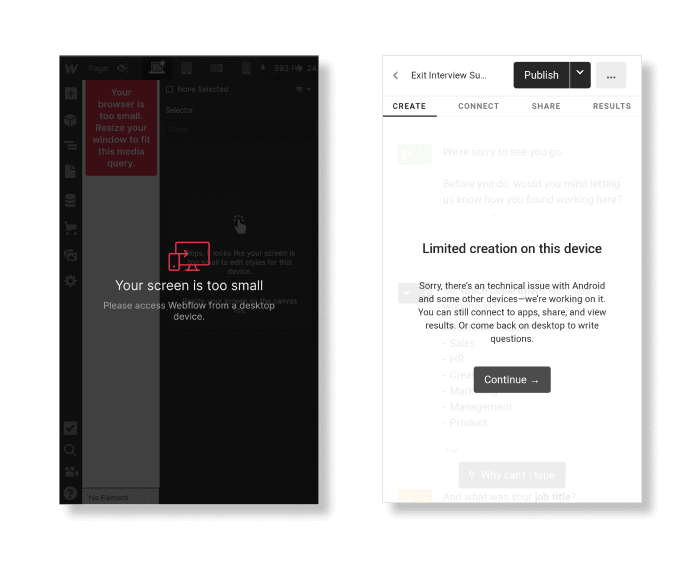
Build a mobile MVP for your key feature
Sometimes, it’s worth the effort to build a mobile version of your key feature. It doesn’t have to replicate the desktop version 100%; it just has to be good enough to show your unique approach.
If that’s not possible, try replicating other onboarding actions like workspace setup, data import, inviting teammates, or 3rd-party account connection.
The goal is to get users “hooked” so they’ll want to return on desktop.
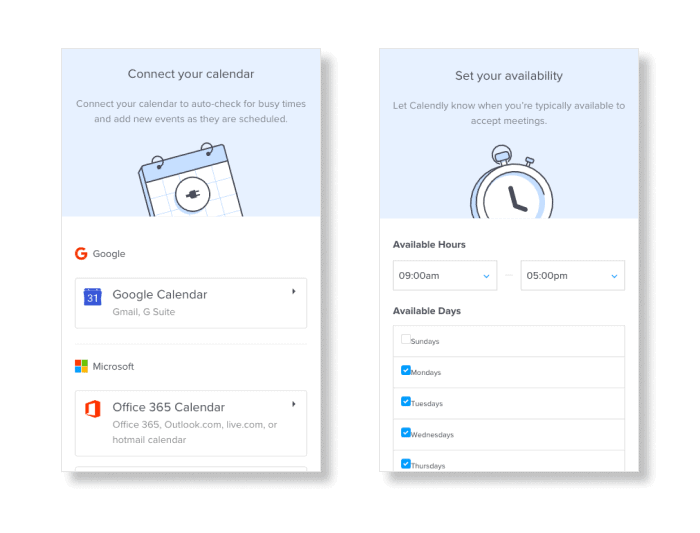
Calendly’s mobile setup flow
4. Redirect users to the desktop version
Mobile onboarding is only half the activation journey. Once a user is intrigued, it’s time to get him or her to open the app on a computer.
If users are eager to try the desktop version right away, send them a magic link to conveniently log in.
For those who aren’t (the majority of your users), send out follow-up emails during their work hours, which can be determined by either IP location or browser time zone.
You can even use a monetary reward to incentivize users to return — as long as the unit economics make sense. For example:
- You offer a 10% discount to mobile signups who complete onboarding actions on desktop within 3 days.
- The ROI will be positive if it increases signup-to-paid conversion rate by ≥12% (assuming other metrics remain the same).
Optimize with a reasonable effort
It might be anti-climactic to say this, but don’t expect your mobile leads to convert as well as your desktop leads.
In the world of B2B SaaS, mobile and desktop traffic are inherently different (even for “bottom-up SaaS”). That’s why you should compare your mobile funnel only to its former self, and stop over-optimizing it when there are signs of diminishing returns.
If you haven’t invested much into your mobile onboarding, it’s almost guaranteed that any optimization effort will result in activation and conversion uplifts. Even if the number seems trivial now, it’ll be a good growth lever as your product continues to scale.